Other Websites Can Rank Above Your Rehab Website When People Search Your Rehab Name


Another website can rank first when someone searches your rehab name. Someone may know your center from a referral or directory. Another result can point to the wrong website, phone, or center.
A rehab brand search can show websites, local profiles, directories, reviews, or ads. Some outside pages help people confirm facility details before calling. Wrong details can send a caller to another website or facility. Each section shows one problem and the next check.
Exact Rehab Name Searches and Modified Searches Can Show Different Results
An exact center-name search points directly toward the named treatment center. The official website is the most direct page for that center search. Added words can change what the person wants from Google.
| Search | Result that can match | Reason |
|---|---|---|
[Center Name] |
Official rehab website | Direct lookup for the named center |
[Center Name] reviews |
Review website | Independent experience information |
[Center Name] accreditation |
Accreditation record | Outside accreditation check |
[Center Name] phone |
Official website or local profile | Direct contact details |
[Center Name] Phoenix |
Phoenix facility page | One specific treatment location |
For example, an accreditation website above your homepage can make sense. The same result above an exact center-name search deserves a closer check. Start with the words used in the search before judging the ranking.

First Check What Google Shows Above Your Rehab Website
Several kinds of Google results can appear above your rehab website. Check each one separately before your team changes anything.
| What appears | What it is |
|---|---|
| Another rehab website | Regular Google result |
| Old rehab website | Former official website |
| FindTreatment.gov | Government treatment listing |
| Accreditation website | Outside accreditation record |
| Review website | Review result |
| Lead website | Referral or lead page |
| Paid ad | Sponsored result |
Regular search results and local profiles come from different Google systems. Accreditation and government pages can help someone check a facility. First identify what appears before changing pages, profiles, listings, or ads.

Check Where a Lead Website Sends the Inquiry
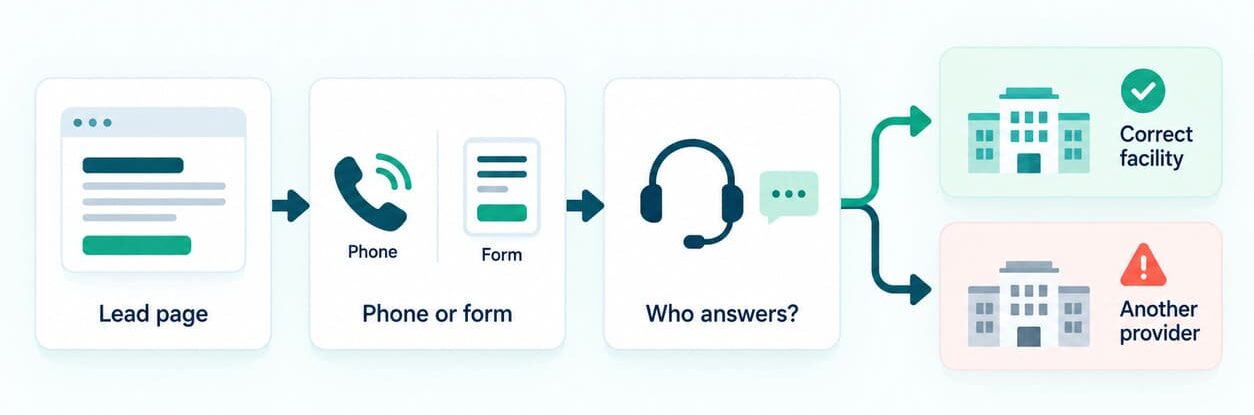
A lead website can mention your center while sending inquiries elsewhere. Open the page and check its phone, website link, and contact form.
Call the displayed number with a non-patient test your team approves. Check which company answers and which facility receives the inquiry. Check the form branding, privacy notice, and company named after submission. Avoid entering patient information during any test.
If another provider receives the inquiry, save the page and contact details. Contact the website owner when facility information or contact details need correction.
Some Websites Above Your Rehab Site Can Help Confirm the Center
Outside websites can confirm important facts about a treatment center. FindTreatment.gov and accreditation websites can confirm specific center details. Someone searching reviews, accreditation, or licensing may want an outside source.
An accurate accreditation page can confirm the center name and location. Matching details can help someone confirm the correct treatment center. A 2024 study checked 697 practices across ten treatment search tools. The study found accuracy problems during checks completed in 2023.
Website Problems Can Stop Your Rehab Site From Ranking for Its Name
Website errors can remove the correct rehab page from name searches. Three separate website problems deserve attention when the correct page disappears from Google.
The Right Rehab Page Is Missing From Google
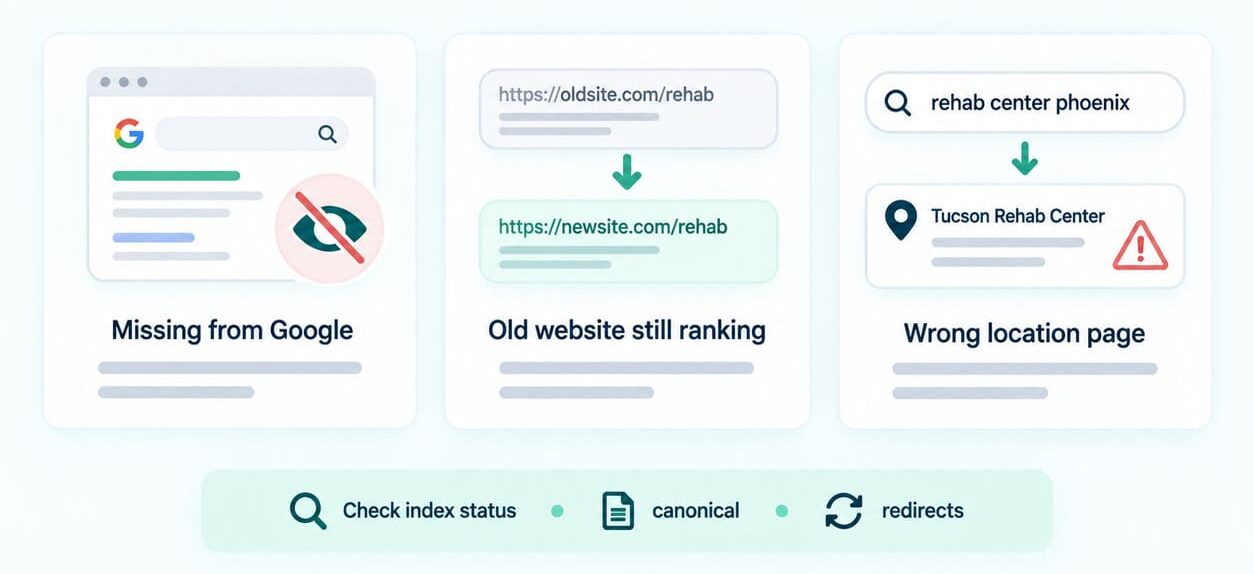
A blocked rehab page can disappear from Google results entirely. Search Console URL Inspection shows if Google can index the correct page. Check noindex code and which page Google treats as the main version. Fix those page errors before looking for outside ranking causes.
Check four items
- Confirm that the page opens normally in a standard browser.
- Search Console URL Inspection finds the correct page.
- No accidental noindex code blocks the page.
- Google treats the correct URL as the main page.
A noindex code asks Google to exclude a page from Search. A canonical tag signals your preferred page among similar URLs.
If the correct page is still missing, a deeper review can show why Google is choosing the wrong rehab page.
An Old Website or Former Brand Still Ranks
An old website can remain visible after a rename or website move. A rehab acquisition can also leave older website pages visible in Google.
Check that each important old page sends visitors to its new page. Check canonical tags and links pointing toward the current pages. Review important directories for links still pointing toward the former website. Google uses redirects and canonical tags when choosing the main page.
Google Ranks the Wrong Rehab Location Page
For example, a Phoenix brand search may rank the Tucson facility page. Compare location names, canonical tags, titles, and links on both pages. Each page for a rehab location should name one facility and its actual services.
Google Can Rank Your Rehab Page but Show a Different Name or Icon
Your rehab page can rank while Google shows the parent company name. A different site name can make the official result harder to identify.
Google supports site names for main domains and subdomains. Google uses one favicon across folders under the same website address. A facility page can therefore show the parent company name or icon. Check the URL before treating the problem as lost rankings.
Multi-Location Rehab Groups Can Miss Problems at One Location
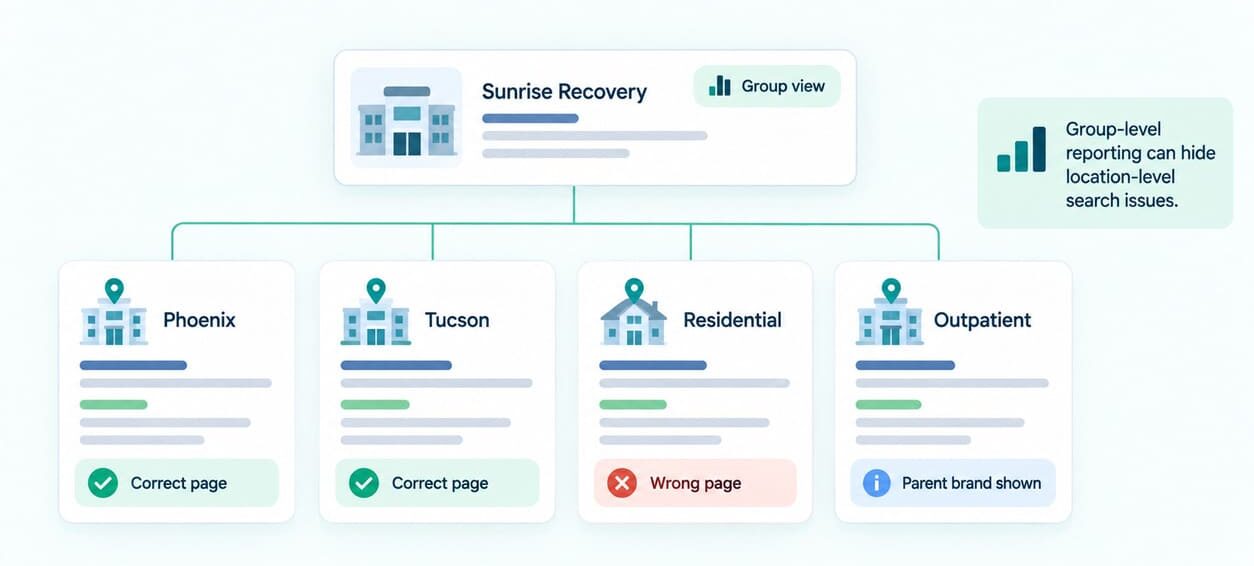
Group reports can hide a problem at one rehab location. One facility may lose clicks from name searches while group totals remain healthy. The same group can present several facility names under one shared website. Check each facility name and page separately in Search Console.
Groups running several rehab locations on one website need separate checks for every facility.
Google May Show the Parent Brand Beside a Rehab Location Page
Several rehab brands can share one parent website across location pages. Google may show the parent company name beside each facility page.
Each facility page can still rank for its relevant searches. Compare each displayed result with the facility name people already know. Mark any location where the parent name hides the expected facility name.
Search Console Can Hide a Problem at One Rehab Location
Search Console totals can hide a problem affecting one rehab location. Google omits the brand filter for sub-properties and low-impression sites. Create one search group for each facility name.
Add misspellings, city terms, and former names when relevant. Then filter the data to the correct facility page. Compare clicks, impressions, click rate, and average position across one period. Check if another page receives clicks from those facility searches.
Wrong Online Details Can Send People to the Wrong Phone, Website, or Location
Wrong facility details can send people to another phone or website. Compare the same approved details across every important public website. Start with one approved record containing the correct facility details. Then compare the official website with the phone, website, and address shown in Google Business Profile.
| Source | Compare |
|---|---|
| Approved facility details | Name, phone, website, address, services |
| Official website | Name, phone, website, address, services |
| Google Business Profile | Name, phone, website, address, hours |
| FindTreatment.gov | Name, phone, address, services |
| Accreditation record | Facility name, location, current status |
| Important directory | Name, phone, website, address |
You can send FindTreatment.gov corrections through its email or phone support. Use FindTreatment@samhsa.hhs.gov or call 1-833-888-1553 for facility updates. Google can update Business Profile information from several outside sources. Mark every mismatch before changing any public listing. Check each listing again after the provider publishes your correction.
For Google Business Profile, open the profile and choose Edit profile. Update the wrong field, save it, then check again. For CARF records, contact CARF when public details need correction. Joint Commission organizations can contact their account executive about demographic changes.

Paid Ads Can Appear Above Your Rehab Website Even When It Ranks First
Paid ads can appear above a rehab website already ranking first. FTC cases document deceptive ads using names from other treatment clinics. Save the query, advertiser, website, phone number, device, and screenshot. Treat paid impersonation as an advertising problem separate from website rankings.
Check Each Rehab Location Separately in Search Console
Check each location with its own rehab name searches and page data. Search Console records impressions when Google displays a result. Clicks show how many visits came from those displayed results.
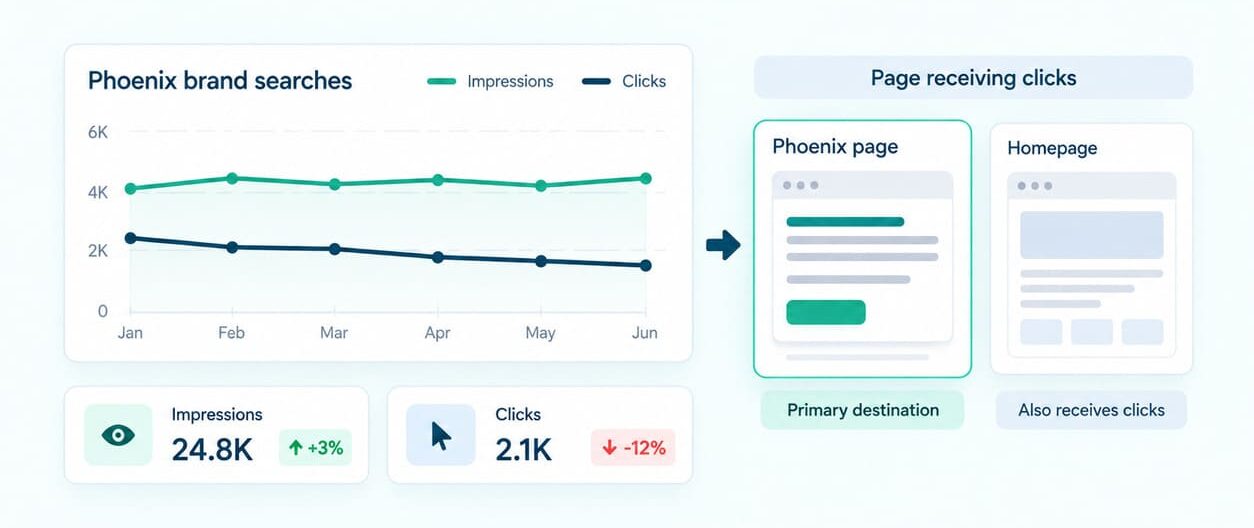
Suppose the Phoenix center received 1,000 impressions last month. Those searches produced 120 clicks to the Phoenix facility page. During the next month, impressions stay near 1,000, but clicks fall to 70.
Now check which page receives the Phoenix brand searches. Search Console may show the parent homepage receiving some Phoenix clicks. That pattern shows the wrong page receiving clicks from Phoenix name searches.
Compare the Phoenix page title, location name, canonical, and internal links. Search Console credits most page data to the canonical URL.
After making the page correction, check the same searches again. Then check whether more Phoenix clicks reach the Phoenix facility page. Call tracking can also show which Google searches lead to admissions calls.
Start With a 60-Minute Check of Google Results for Your Rehab Name
One focused hour can uncover the biggest problems around your rehab name. Check six areas, then write down each problem you find. Start with any problem sending people to the wrong contact point.
| Time | Job |
|---|---|
| 0 to 10 minutes | Search the rehab name, city variation, reviews, phone, and accreditation |
| 10 to 20 minutes | Check the official page, index status, and Google-selected main URL |
| 20 to 30 minutes | Check Google Business Profile details |
| 30 to 40 minutes | Check government and accreditation records |
| 40 to 50 minutes | Check facility name searches and pages receiving clicks |
| 50 to 60 minutes | Write down every problem and affected phone, page, or listing |
Several problems across pages, profiles, and listings may need a deeper review of the whole rehab website.
Fix Errors That Send People to the Wrong Phone, Website, or Center First
Start with errors sending people to the wrong phone, website, or center. Work down the list after your team fixes higher-risk problems.
- Wrong contact details: Fix wrong phone numbers, website links, and misleading paid ads first.
- Missing or wrong pages: Fix missing pages, wrong canonicals, and old websites still appearing.
- Wrong facility information: Correct outdated names, addresses, phones, services, and website links.
- Location and parent company problems: Check wrong location pages or unexpected parent names.
- Accurate outside results: Monitor correct government, accreditation, directory, or review pages.
Recheck each listing after the provider publishes your correction. Check the affected facility page before changing the whole group website. Fix one documented problem at a time, then confirm the change.
Wider problems may need SEO work across the website, local listings, and facility pages.