How to Optimize a Google Business Profile for Local SEO


Google Business Profile optimization starts with accurate services, hours, locations, and contact details. Local ranking uses relevance, distance, and prominence across nearby business results.
Accurate business details support relevance, while wider reputation contributes to prominence. Physical distance depends on customer and business locations.
Business Profile work forms one part of local SEO across Search, Maps, and website pages. A complete profile helps customers compare nearby businesses before making contact.
What Google Uses to Rank Local Businesses
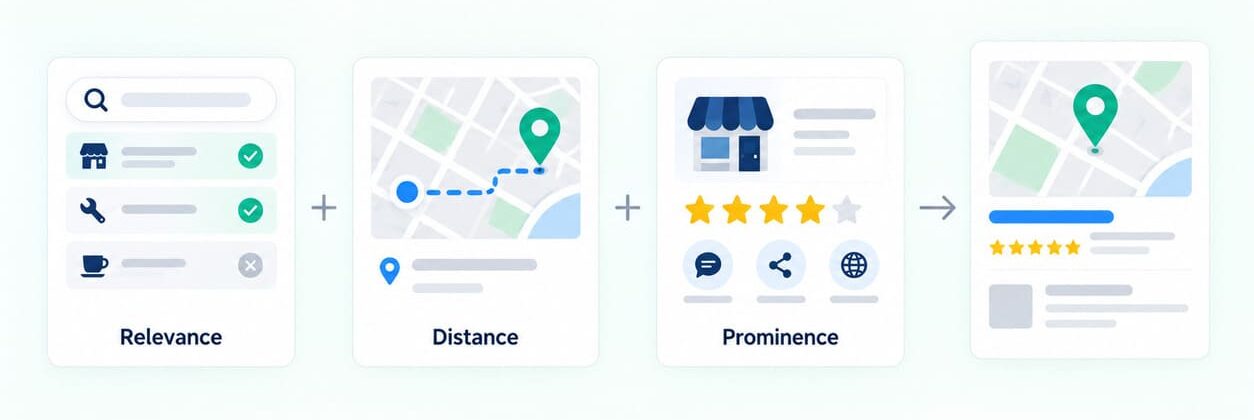
Local ranking uses relevance, distance, and prominence when comparing nearby businesses. Relevance covers query matching, distance covers geography, while prominence covers wider business reputation. Businesses cannot pay Google for a better local ranking.
Relevance
Relevance describes how closely a Business Profile matches the intent behind a customer query. Complete categories, services, and business details help Google match businesses with relevant local queries.
Distance
Distance reflects how far each eligible business is from the customer location. Profile edits cannot change the physical distance between customer and business locations.
Prominence
Prominence describes how widely known and established Google considers a local business. Prominence can reflect links, customer reviews, ratings, and wider web information. More reviews and positive ratings can support stronger local ranking.
Verify the Google Business Profile Before Optimization
Before editing, confirm the Google Business Profile belongs to an eligible business. A Business Profile requires an eligible business and a person authorized to represent it.
Eligibility rules determine which businesses can create and manage profiles. Eligible businesses normally meet customers at a staffed location or visit customer addresses. Online-only businesses fall outside standard Business Profile eligibility rules.
Verification confirms that the account holder can manage the business profile. Available verification methods depend on business type, public information, region, and profile conditions. Use the verification option available for that profile.
Claim the correct Business Profile before editing categories, hours, or customer information. Confirm account access for every person responsible for future Business Profile changes. Create separate profiles only for locations meeting Google eligibility rules.
Use the Business Name Customers See Offline
Use the business name shown consistently on storefront signs, websites, invoices, and stationery. Avoid adding cities, service phrases, phone numbers, or promotional wording solely for rankings.
If storefront signs read Oak Street Dental, use Oak Street Dental. Website branding, signs, and customer documents should use the same business name.
Business name requirements restrict extra information inside the profile name. Such additions can lead to profile suspension.
Choose the Most Accurate Business Categories
Choose categories that describe the business customers visit or hire. The primary category should describe the main business type with the closest available option. Additional categories should represent secondary business types.
Category selection rules recommend the most specific category matching the core business. Business Profile policy recommends using as few categories as needed. Categories describe business types, while the Services field lists individual offerings customers can request.
Choose the Primary Category
Select the closest available Google category for the main business type. Prefer a specific category when that option accurately describes the company. A roofing company can choose Roofing Contractor when roofing represents its main business. Avoid broader categories chosen only to reach unrelated local queries or extra visibility.
Add Relevant Additional Categories
Add secondary categories only for other business types the company operates. Selected categories can change available Business Profile features for some businesses. A category change can prompt another verification request.
Complete the Address, Hours, Phone, Website, and Business Attributes
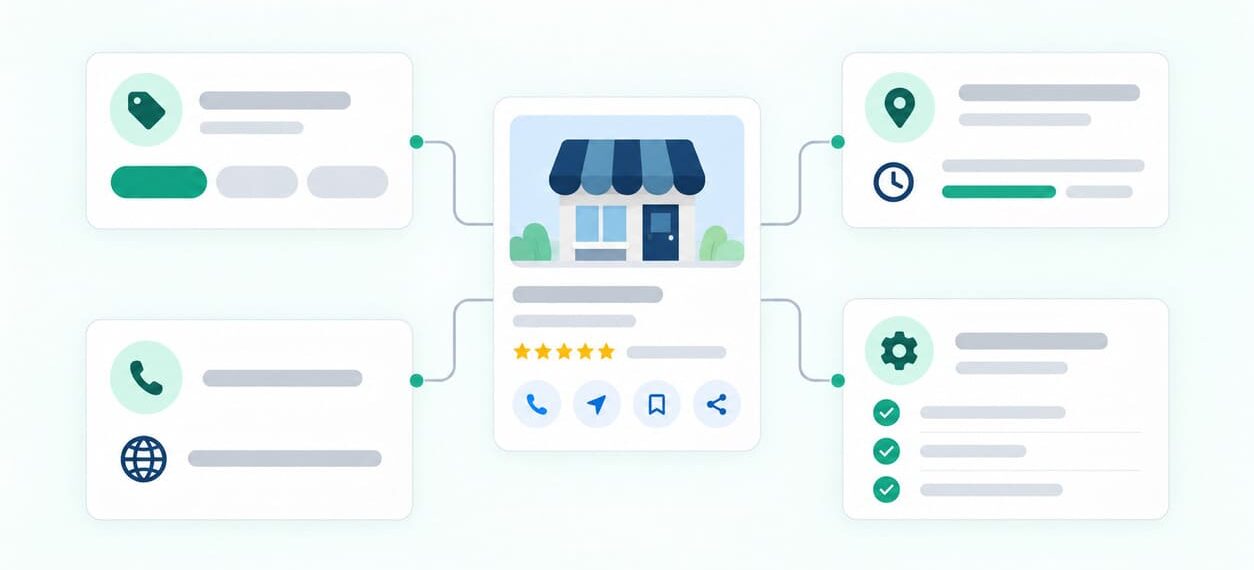
Fill every applicable field with information customers can confirm when contacting or visiting. Customers should reach the correct location, phone number, operating hours, and official website. Regular hours should reflect periods when customers can visit, call, or receive service.
Use the address only when customers can visit that location. Use a phone number that connects customers directly with the individual business location. Google recommends a local phone number when one is available.
Enter regular hours, then add special hours for specific date changes. Add attributes that match features such as parking or accessibility. Choose only attributes that customers can use at the business.

Set Service Areas From Places the Business Serves
Service areas should reflect cities and postal areas where the company serves customers. Current service-area requirements allow up to twenty supported geographic areas. Businesses can add cities, postal codes, and other supported geographic areas.
Service-Area Businesses
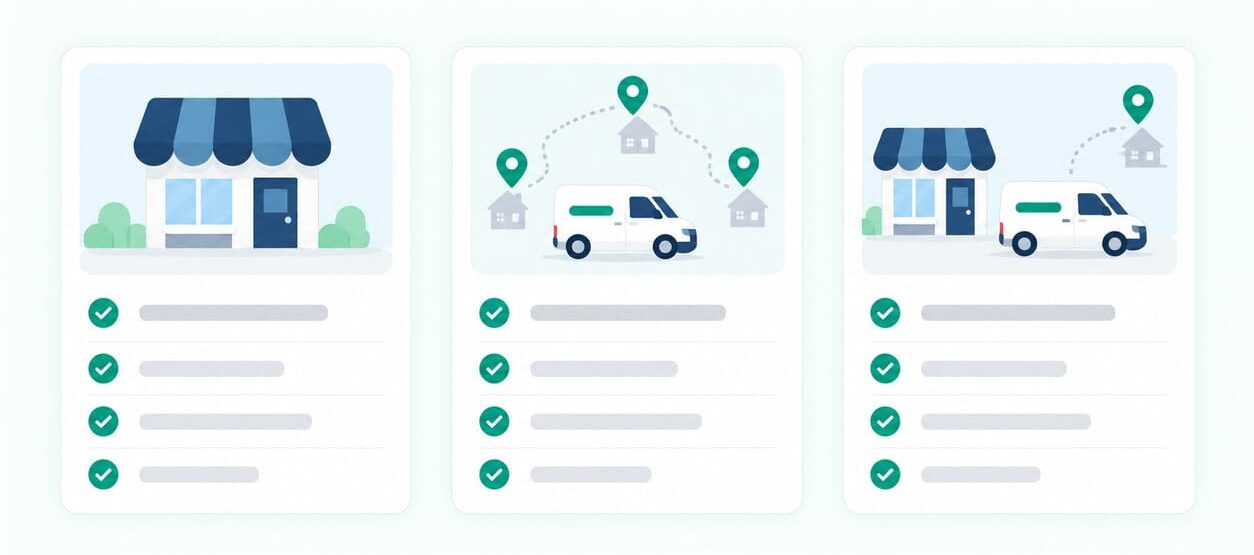
A service-area business visits or delivers directly to customers away from its address. Hide the address when customers never visit the location during stated business hours. A plumber working from home can hide the residential address from customers. Add only cities or postal areas where customers receive service.
Hybrid Businesses
A hybrid business receives customers onsite while also serving people across nearby areas. Hybrid businesses can show storefront addresses when staff receive customers during stated hours. They can also list geographic areas where staff provide off-site customer service.
Google recommends keeping the overall service area near the business base. Its general guidance uses roughly two hours of driving time. Some business models can serve broader areas when operating conditions support that coverage.
List only locations where the company provides customer service.
Write a Factual Google Business Profile Description
Use the description for information customers need before contacting or visiting. State what the company does, major offerings, mission, and relevant history. Promotional deals, sales prices, and website links belong outside the Business Profile description.
Current business description requirements limit the field to 750 characters. Use the available space for specific company facts that customers can verify elsewhere. Avoid keyword repetition that adds no customer information.
Review every AI-assisted description for factual accuracy before publishing it. The feature is available only in selected regions and languages.
Add Services Customers Can Request
Add services that customers can request directly from the company. Supported profiles can add service descriptions, prices, and custom services. Relevant services can appear highlighted when local customers search for matching offerings.
Use Service Names Customers Recognize
Choose service names customers already recognize for the work. Use standard wording that matches services the business provides. Custom service names should exclude phone numbers, prices, personal information, and promotional wording.
Add Descriptions and Prices Where Relevant
Some Business Profile categories allow service descriptions and prices. Use factual descriptions that help customers compare available work before contacting the company. Add prices only when the displayed amount matches the listed service. Group services under matching categories when Google provides suitable options.
Repeated keywords add little value when descriptions lack useful details about the service.
Add In-Store Products for Eligible Retail Businesses
Eligible retail businesses can display in-store products through supported Business Profile product features. Product availability depends on country, business type, and profile eligibility. List only products customers can purchase from that physical location.
Retailers can add products manually or use supported point-of-sale and inventory connections. Update or remove items when store inventory changes. Check eligibility before using automatic in-store product feeds.
Product entries should reflect merchandise that local shoppers can purchase from that store. Avoid adding product names solely for broader keyword coverage.
Add Links for Bookings, Orders, Menus, and Services
Eligible Business Profiles can add supported links for menus, services, bookings, and online orders. Available link options vary across business types, countries, and customer actions.
Booking and order links must open working pages where customers can complete the task. Use a dedicated destination where customers can complete the selected booking or ordering task. Check every destination after website redesigns, menu updates, booking migrations, or provider changes.
Links that block Google crawlers can disappear from the Business Profile.
Ask Customers for Honest Google Reviews
Ask customers for honest feedback after a completed purchase, visit, appointment, or service. Businesses can request customer reviews through direct links and QR codes. Current review request rules prohibit incentives for posting, changing, or removing reviews.
After completing a customer job, send the review link with the receipt.
Review Count and Ratings
Reviews help potential customers compare service quality and recent experiences before making contact. Google includes review count and positive ratings within local prominence. Review volume and positive ratings can contribute to local ranking performance. Avoid chasing one arbitrary review count across businesses with different customer volumes.
Reply to Customer Reviews
Reply with information that directly addresses the customer experience described in the review. Address service details, praise, questions, or complaints using factual and respectful responses. Avoid repeating service phrases solely for ranking purposes.
Short responses work well when the customer comment needs little additional detail. Detailed complaints need responses addressing the exact customer issue. Review replies should remain professional, specific, and useful for future customers reading them.
Add Photos and Videos That Represent the Business
Add current media showing storefronts, customer areas, products, staff, and completed work where relevant. Photos and videos help customers inspect the location, products, services, and facilities.
Storefront and Interior Photos
Exterior photos can help customers recognize the correct entrance before arriving at the location. Interior photos can show customer areas and facilities before a visit. Use focused images with accurate lighting, useful context, and minimal visual alteration.
Product and Service Photos
Product photos should reflect merchandise customers can purchase from that local store. Service photos should show completed work without making the result look misleading. Choose images that help customers recognize locations, products, people, or completed services.
Current photo and video requirements recommend focused images with minimal visual alteration. Current guidance recommends 720 x 720 pixels for Business Profile images. Business Profile videos can be up to thirty seconds long.

Match Website Business Information With the Profile
Business Profile information can come from owners, official websites and public sources, and user contributions. Website facts should match current operations and the Business Profile information customers can see. Different phone numbers, addresses, or hours can send customers toward outdated business information.
Use a Relevant Website Page for Each Location
Link each customer-facing location to the website page describing that location. The location page should identify address details, local services, hours, and contact information. Multi-location companies should separate operating facts across dedicated pages for each eligible location.
Match Current Business Facts
Compare business names, addresses, phone numbers, opening hours, and website destinations across public sources. Confirm each changed business fact internally before correcting every outdated public source.
If Saturday hours change, update both the Business Profile and matching location page. The same source check applies after phone, address, service, category, or location changes. Location pages can also help customers find branch-specific information outside the profile.
Add LocalBusiness Schema to Relevant Website Pages
LocalBusiness schema labels visible business facts on webpages representing eligible local business locations. Supported LocalBusiness properties include business types and location details. Use the most specific applicable LocalBusiness subtype for each eligible business location. Schema properties should match business information that customers can see on the webpage.
One Location
A single eligible location can use one applicable LocalBusiness subtype. Include accurate name, address, phone, opening hours, and other supported visible properties. Place the markup on the website page describing that exact business location.
A restaurant location page can use Restaurant when that subtype matches the business. Validate final markup before publication using current Google Search testing tools and documentation.
Multiple Locations
Each eligible location can use its own LocalBusiness entity within relevant webpage markup. Each entity should describe the matching location page and its visible business facts. Separate addresses, telephone numbers, hours, and operating details across distinct location entities.
Valid markup never guarantees a rich result, ranking, or AI citation. Use schema only for business facts that customers can already see on the webpage.
Review markup rules restrict rating markup for businesses reviewing themselves. Leave AggregateRating out when the website displays reviews about its own business only.

Check Business Profile Performance
Verified profiles can review discovery and interaction data through profile performance metrics. Business Profile Performance shows only metrics available for the specific business.
Search Terms
Search terms show the queries customers used before the Business Profile appeared. Use search terms to inspect how customers discover the company. Query appearance alone cannot provide an exact local ranking position for every customer.
Profile Views
Profile views report unique visitors opening the Business Profile across Search and Maps. Performance counts one person once daily within each device and platform combination. Compare matching date ranges before judging changes in profile views.
Customer Actions
Business Profile Performance can report several customer interactions across Search and Maps. Available metrics can include direction requests, calls, website clicks, bookings, and other actions. Some business types can also show menus, products, offers, or other category metrics.
Performance data can include customer activity from organic Google results and Google Ads. Separate profile exposure, customer actions, advertising, and website outcomes before judging local SEO work.
Compare Reporting Periods
Choose comparable reporting periods before reviewing changes in Business Profile activity. Record major profile edits beside each reporting period, including dates and affected fields. Use supporting evidence before crediting a single Business Profile edit for an increase.
Seasonality, advertising, opening hours, promotions, and operational changes can influence profile interactions. Use profile metrics as starting points before drawing stronger conclusions.
Businesses can send aggregated profile interactions into Google Analytics for additional reporting. Shared metrics can include calls, directions, website clicks, messages, bookings, and menu clicks.

Review Profile Information After Business Changes
Operational changes should prompt an immediate review across profile, website, and schema information. Assign internal ownership for every customer-facing profile field and connected website page.
If a shop moves, update its profile address, directions, location page, and schema markup. Check Business Profile eligibility again after changing storefront or service-area operations. Confirm the effective date before different teams publish new location details across public sources.
A phone change requires Business Profile, website, booking, and contact-page updates. Test public phone numbers after every published contact change.
Changed opening hours require profile updates across regular, seasonal, and special operating periods. Review holiday hours before customers encounter outdated opening times during planned closures.
Service changes require updates across Business Profile fields and relevant website service pages. Remove retired offerings from Business Profile service fields and related website pages.
A changed business type can require fresh category, service, and eligibility checks. Certain category changes can prompt another verification request.
For larger teams, record who updates the profile, website, and schema markup after each change.
How Google Uses Business Information Across AI Search and Maps
Local business information can appear across AI-powered Search and Maps experiences. Business Profile, Google Search, and Maps use different systems and data sources. Each surface has its own eligibility conditions, information sources, and presentation rules.
Business Profile Information Can Appear in Google AI Experiences
Generative Search can include information about local businesses, products, and services. Business Profiles can support product and service visibility across generative Search experiences. No Google documentation promises AI placement, citation percentages, or fixed visibility outcomes.
AI Overviews and AI Mode Use Existing SEO Foundations
AI Overviews and AI Mode still use normal crawling, indexing, and SEO foundations. AI Overviews and AI Mode use existing Google Search ranking and quality systems.
Supporting website links require normal Search indexing and snippet eligibility before possible inclusion. AI Search requires no separate markup, special schema format, or new machine-readable file.
Website content should remain crawlable, accessible, useful, and accurate for human readers. Current Search documentation warns against mass content targeting every possible query variation. Search systems can interpret synonyms, related concepts, and broader customer intent.
Business Profile information should remain current across Google AI Search experiences. GEO work should support normal SEO foundations within Google Search, never replace them.
Website-level work can extend into broader AI search visibility beyond Business Profile fields.
Ask Maps Uses Place Information Reviews and Web Content
Conversational local discovery in Maps can combine place details, reviews, photos, and web information. Ask Maps started rolling out across India during March 2026.
Ask Maps analyzes information from more than 300 million mapped places worldwide. Its sources include community reviews, place information, photos, and wider web content. Ask Maps belongs to Google Maps, while AI Overviews and AI Mode belong to Search.
Google Business Profile Optimization Checklist
Identity
- Confirm ownership and verification for every qualifying business location.
- Use the established public business name across profile information.
- Select categories representing business types the company operates.
Business Information
- Confirm the customer-facing address where storefront rules apply.
- Add service areas only for places receiving customer service.
- Check the main phone number and official website destination.
- Review regular and special hours before holidays or schedule changes.
- Select attributes matching facilities and services customers can access.
Offering
- Write a factual description of the company and its offerings.
- Add services customers can request directly from the company.
- Add retail products only where eligibility and availability permit.
Customer Evidence
- Request honest reviews from customers without incentives.
- Reply with information relevant to each customer experience.
- Add current storefront, interior, product, and service photos.
- Add video when it helps customers inspect locations or work.
Website Support
- Match current business facts across profile and website pages.
- Add accurate LocalBusiness schema on relevant location pages.
Measurement
- Review search terms, profile views, and customer interactions.
- Compare matching reporting periods before drawing performance conclusions.
AI Access
- Confirm important website pages remain indexed and available in Search.
Frequently Asked Questions
Can an Online Only Business Create a Google Business Profile?
Online-only companies generally fall outside standard Google Business Profile eligibility rules. Eligibility requires qualifying in-person customer contact during stated business hours. Businesses serving customers at staffed locations or customer addresses can qualify.
Can a Service-Area Business Use a Home Address?
A service-area business can operate from a residential or private business address. Hide the address when customers never visit that location during stated hours. Add supported service areas where staff visit or deliver directly to customers.
Can One Service Business Have More Than One Business Profile?
Separate staffed locations can qualify for individual Business Profiles when each location meets eligibility rules. Each qualifying location needs its own staff and separate service area. Create only one Business Profile for each operating location.
Can Changing a Business Category Trigger Verification Again?
Changing the primary or additional category can prompt another verification request. Category edits can also change available Business Profile features for certain business types. Choose categories only when they accurately describe the business type.
How Many Business Categories Should I Use?
Use the smallest category set that still describes the core business. Services and amenities belong in their own Business Profile fields.
Can Google Change Business Profile Information From Other Sources?
Official websites and wider public sources can contribute Business Profile information. Owners, users, licensed sources, and Google systems can all contribute business information. Check important profile fields after major website, location, service, or operational changes.
Can Google Business Profile Connect With Google Analytics?
Business Profile can connect directly with Google Analytics. Linked accounts share aggregated profile interactions inside Google Analytics reporting. Shared metrics can include calls, directions, messages, bookings, website clicks, and menu clicks.
Are Booking and Ordering Links Available to Every Business?
Business link options vary across categories, countries, and customer actions. Eligible profiles can add supported booking, ordering, menu, shopping, or service links. Check current Business Profile options before publishing or changing customer destination links.
Does Valid LocalBusiness Schema Guarantee a Rich Result?
Valid LocalBusiness markup never guarantees that Google will show a rich result. Eligible rich-result features can appear when Google Search chooses to display them. LocalBusiness markup should match facts already visible on the webpage.
Maintain Accurate Business Information Across Search Maps and AI
Complete profile details, customer reviews, and updated website information support local discovery across Google. Review those records whenever locations, categories, services, or opening hours change.